MicroPythonOS 0.22.0 is out. This release makes the OS a real media player — MP3 and video, with pause, resume and seeking — and it adds sound to badges that only have a bare piezo disc for a speaker.
Music from a microSD card
MP3 is decoded by a new native mp3dec module built on minimp3: MPEG-1, MPEG-2 and MPEG-2.5 Layer III, constant and variable bitrate, mono or stereo, 8–48 kHz. The file's own sample rate is used, so nothing is resampled and no pitch shift creeps in.
Decoding releases the interpreter lock, which means the UI keeps rendering while music plays. Duration, channel count and sample rate are read in pure Python, so the music player can list a folder and show lengths without decoding anything. On desktop the same code path hands MP3 to the host player.
Video, with controls that behave
The video player gained the controls it was missing: tap to pause and resume, a control bar that appears while paused and hides itself afterwards, looping, and seeking. Seeking is sample-accurate for WAV audio and frame-accurate for MP3, including VBR files, and the audio mixer keeps its position instead of restarting.
Under the hood the IMA ADPCM audio commonly muxed into on-device videos got about 17× faster to decode — 33.6 µs per sample down to 1.9 µs — so the audio track now costs about 2 ms of each 320×240 frame instead of 49 ms. Without that, a video with sound simply could not hold its frame rate.
Games at 56 frames per second
A native renderer can now own its own RGB565 surface and present only the rows it actually changed, while LVGL stays the only writer of the panel. On a 320×240 badge that took our Breakout demo from 7.6 to 56 fps, with no flicker and no tearing.
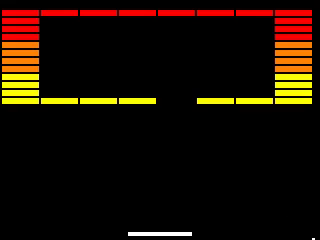
The measurements behind it are in the docs: a full frame is about 25 ms of SPI at ~6.2 MB/s, so a game is designed around bands of rows rather than whole frames. If you have been waiting for an excuse to port a 2D engine, this is it — the guide, including the parts that do not work (stealing LVGL's display buffers, pausing its refresh), is in Native C/C++ Apps.
Sound from a bare piezo
Badge boards usually have a passive piezo disc and no audio codec. That disc is now a playback output in its own right: an LEDC channel at 78 kHz fed from an 8 KB ring buffer that a timer interrupt keeps full, so WAV and MP3 play through it. Because the disc only responds near 4 kHz, there is an optional per-output exciter gain for material whose harmonics are too weak to be heard.
It is verified by measurement and not by ear: an acoustic test plays a known note sequence and folds each spectral peak to the expected harmonic, which is what makes low notes checkable at all through a resonator.
New board: D-Shell ESP32-S3 N16R8
A new target with ST7789V display, GT911 touch, keypad, WS2812 LEDs, QMI8658 IMU, MAX98357A audio and a buzzer, with automatic board detection. See supported hardware for the full list.
Smaller things worth knowing
- The AppStore re-syncs installed state when it resumes, so an app you uninstall from its detail page leaves the Installed list, and the install button regains focus so keypad users can still press A.
- Two of the most-used font sizes are no longer compressed: a full text screen redraws about 20 ms faster at 12 px, for 6.7 KB of firmware.
- In a file picker, tapping a folder now enters it instead of selecting it, and long-pressing selects an entry — so a picker can finally reach nested folders.
- The console no longer freezes every task for ~28 s when a host tool opens the USB-CDC port and sends non-REPL bytes.
- Flat apps get their own helper modules, so two apps that both ship a
lora.pyno longer share the first one that loaded. - Time zones updated to IANA 2026e, with half-hour offsets east of UTC fixed.
How to get it
If you are already running MicroPythonOS, open Settings → OS Update: the update is delivered over the air, and the boot partition alternates so a bad update is recoverable.
If you are starting fresh, the web installer flashes a supported board from the browser, and the browser build lets you try the OS without any hardware at all.